Archive for March 2011


Conducting (and photographing) the Phoenix Symphony

March 31st, 2011 — 11:00am

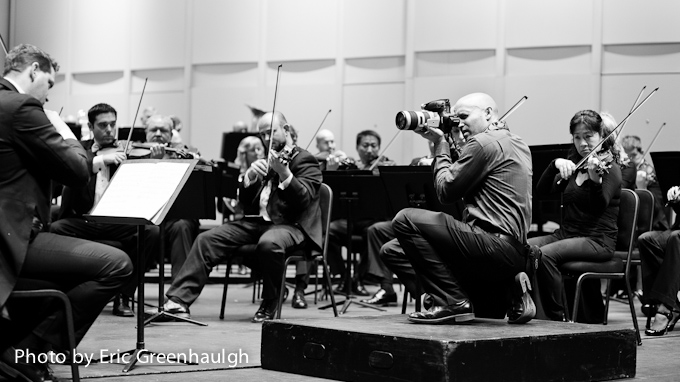
Jared Platt photographing the phoenix symphony

I am working on a project for the Phoenix Symphony right now and went to a recent rehearsal to photograph some shots for their upcoming 2011/2012 season brochures and banners.  It is quite an honor to do this job and I am thrilled to be a par of promoting the Phoenix Symphony.  I am particularly looking forward to their performance of Sheherazade in March of 2012.  Anyway, it was an interesting place to stand.  I may have chosen this vantage point just so I could stand where the conductor stands.  In the photo above, I am trying to explain to them what I am looking for in the photograph and in the image below, they are playing the most hilarious renditions of various masterpieces, all purposefully out of tune.  I thought it was pretty funny.  But then I was in an orchestra when I was young, so their musical savant humor is not lost on me.

My assistant for the day, Eric Greenhalgh snapped a few images of me working, and I thought they were amusing.  Thanks Eric.

Jared Platt photographing the phoenix symphony

I know the trumpet player in the next photo was getting a real chuckle out of my proximity to his horn.  I know I was…

Jared Platt photographing the phoenix symphony

So what do the photos I took look like?  You’ll have to tune in in a few weeks for that.  I am still working on the project and will unveil a few of them, once we wrap up the first batch for the symphony.  And if you are a Symphony goer, you will most likely see some of the images coming in to you through your mail.

If you are in Phoenix, or passing through, take the time to go see these talented musicians perform.  I am completely impressed, and I don’t impress easily.  And don’t miss Sheherazade.  I’ll see you there.

Jared Platt photographing the phoenix symphony

Thanks again to Eric Greenhalgh, who was assisting me on this shoot for grabbing a few cool shots of me working.  Check out his work.  He’s a good photographer.

1 comment » | Commercial Photography, Editorial Portraits, Photography, Stories

I Fought the Law and the Law Won: A Portrait of Sheriff Paul Babeu

March 30th, 2011 — 1:54am

Isaac Bailey in the Sheriff's Car

“I fought the law, and the law won!”  - The Clash

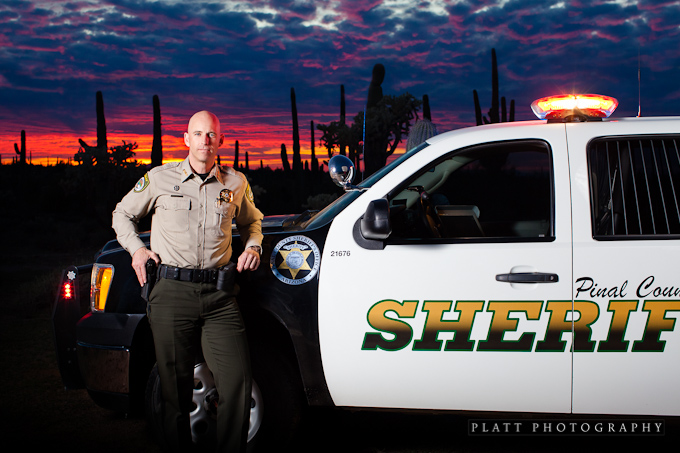
My good friend Isaac Bailey came with me on assignment to photograph Sheriff Paul Babeu, Sheriff of Pinal County, Arizona.  Sheriff Babeu has received a lot of publicity over the last year in his efforts to fight the drug and human trafficking in southern Arizona.  Of course, Isaac needed to be put in his place, so he took a ride in the BACK of the Sheriff’s truck.  I thought the photo above would be good for his wall.

An hour or so south of my home is a little town called Florence, which is the county seat of Pinal County.  It is smack dab in the middle of the desert.  So when the Sheriff needed portraits that said “Arizona,” there was no better place than his back yard.  Just southeast of Florence is some of the most spectacular desert I have ever seen, and I have seen a lot of desert.  I found the location for these shots on a full day scouting trip specifically for this shoot.  If you want to find the right location, you just have to get in a car, and drive… with an iPhone and google maps, of course.

Portrait of Sheriff Paul Babue Jared Platt

I prefer the serious versions.  I like to think of the Sheriff as the tough law man of the west, but I suppose it is nice to see that the Sheriff has a human side as well.  And Sheriff Babeu is quite a nice man.  I have known him for a while now and I have always enjoyed knowing him.  But I still like seeing the Sheriff with a serious face.

My hat is off to Sheriff Babeu and his team.  They have a difficult job to do.  The Sheriff has Mexican Drug Cartel hits taking place in his county.  But, he is taking the fight to the cartels, coyotes and bandits that operate in Pinal county as they traffic drugs and humans north.  Its a tough job and he gets a lot of negative press from people who don’t understand what is happening out here in the desert and even death threats from the Mexican Drug Cartel.  You have heard of the rancher who was murdered in his home in southern Arizona… this problem is very real.  People are afraid out there.

Portrait of Sheriff Paul Babue

This last shot was a last minute deal.  We thought the light was gone, due to a serious bank of clouds, but then the clouds showed a break and we could expect some beautiful colors, so we made ready very quickly and took the photo.  The sunset and the police lights required a higher ISO with a slower shutter speed of 1/50, but without a flash, the Sheriff and his truck would be fairly dark, so we have a set of White Lightning mono-lights powered by batteries, and Isaac holding a reflector off to the right to soften the shadow on the Sheriff’s face.  I think it turned out nicely.

Portrait of Sheriff Paul Babue

You know, while I was speaking to him, he also expressed a lot of concern for the Mexican citizens being used, endangered and even left to die by the cartels and the coyotes in the desert.  He told me of several instances where the Sheriff’s office rescued Mexican citizens who had been left to die in the desert because they were too slow or couldn’t carry the drugs anymore.  His office rescues these poor people and saves their lives in an inhospitable place that will kill someone very quickly.  It’s a rough place out there in the desert, add some drug cartels, some armed bandits and a few cyotees and it gets a lot more rough.  I was floored by the stories he told us.  It was like a mob movie and a western, mixed with a little Blood Simple by the Coen Brothers.  It is bizarre to know what is happening just an hour south of my home.

He’s a good man, and he’s doing a tough job and taking a lot of flack for it.  I don’t live in Pinal County, so I can’t vote for him, but he’s got my vote.

Photography by Jared Platt, Platt Photography

Subject: Sheriff Paul Babeu

Location: The Desert Southeast of Florence, Arizona

Comment » | Commercial Photography, Editorial Portraits, Environmental Portraits, Photography, Portraits, Stories

Making Black and White Presets in Lightroom (2 of 2)

March 29th, 2011 — 11:51am

Making a Rich Black and White Preset in Lightroom 3 from Jared Platt on Vimeo.

In a previous Lightroom Podcast, I talked about making great black and white images in Lightroom 3. Now, you need to make a great black and white preset in Lightroom, so you will never again have to touch all those sliders. In this follow up video, you will learn to make a intelligently designed preset to add a rich black and white effect to any image at the touch of a button.

See the previous post on making beautiful black and white images in Lightroom 3.

Photography: Platt Photography
Software: Adobe Lightroom

1 comment » | Adobe Lightroom, Adobe Lightroom, Lightroom, Photography Lessons, Podcasts, Post-Production

Enlarging Photographs for Print with Lightroom

March 19th, 2011 — 6:24pm

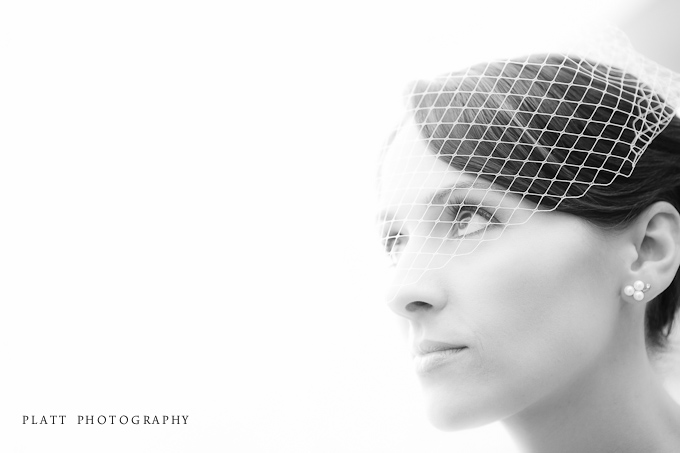
Portrait of Bride at a Wedding in Chandler Arizona

I was producing a seriese of 30 inch prints for Hype Parke Jewelers, for a bridal wedding event at the Biltmore in Phoenix, Arizona and obviously needed to enlarge the image from about 20 inches to 30.  Shooting with the 5D Mark II, make enlargements a rare thing because the file is so big, but anytime I need to go beyond a 16×20, I need to do a little enlargement work on the image to make it work for the larger print.  In the past, I used Genuine Fractals  to enlarge my images and it did a fine job.  Recently, Genuine Fractals was apparently purchased by OnOne Software and then renamed to Perfect Resize.  I have been playing with it and while it does a god job, and actually does the math a lot faster than its predecessor, the interface is much, much slower.  Which lead me to ask myself, “do I need to use a third party software for standard enlargements?”

So, I decided to do a test.  I do a lot of tests… but I swear I do not have OCD.  But my obsession, turns out to be to your advantage.

First, I enlarged this image in Photoshop with the Perfect Resize 7.1 plug in to 30 inches wide at 300 dpi.  The results were acceptably good for the print.  You will see on the image below, that the process of resizing an image tends to create a painterly texture, but when printed, that texture is generally swallowed up in the texture of the print surface and the grain patterns of the emulsion.  So, I am pleased with the results and they will print nicely.  But, remember, I had to open the image in Photoshop and run it through the Perfect Resize plugin or run it through the Perfect Resize plugin in Lightroom, which has a very slow interface.

Enlargement by Perfect Resize 7.1 by OnOne Software

Then I went back to Lightroom and simply exported the image from Lightroom and told Lightroom to enlarge the file to 30 inches at 300 dpi with a standard print sharpening added to the image on export.  The process was a lot faster than dealing with the Perfect Resize interface and the results were just as good, if not better.  If you look at both images on the dark pupil and iris of the eye, you will see more of a painterly texture with a bit more banding in the Perfect Resize enlargement above than you will in the Lightroom version below.

Lightroom enlargement with print sharpening

So I wanted to see if I could do it even better right our of Lightroom without using any other software or Plugins.  And I promise, I am not OCD, I am just curious!  So I added a bit of grain to the image in Lightroom.  You can certainly see the grain in the image below, but observe what it has done in the pupil and iris area.  No more weird patterns.  I’m going to go with the added grain and no painterly patterns.  It is far more beautiful and takes a fraction of the time to make the enlargement.

Lightroom enlargement with LR sharpening and grain

Now, this was a fairly simple enlargement from 20 to 30 inches.  I am not saying that Perfect Resize is not a good tool for enlargement, it is very good, and indispensable when it comes to extreme enlargements, but for the day to day enlargements, I find that Lightroom does a fantastic job all on its own.  So I will trust Lightroom to make the enlargement and save my time for the more important things in life.

Now, I’m off to help my son solve an particularly hard level on Angry Birds.

For a step by step lesson on what I did to get these results in Lightroom, see the Lightroom Podcast below.

Making Photo Enlargements in Lightroom 3 from Jared Platt on Vimeo.

There are plenty of plugins and photoshop methods for enlarging photographs beyond their native size, but Lightroom 3 can match or beat even Genuine Fractals or Perfect Resize on standard every day enlargements.

In this video you will learn how to use Lightroom to enlarge your digital images without the use of Photoshop or a Plugin.

Photography Details

Photography by Jared Platt, Platt Photography

Subject: A Bridal Portrait

Location: The Inspiridor in Chandler, Arizona

Comment » | Adobe Lightroom, How-To-Articles, Lightroom, Photography, Photography Lessons, Podcasts, Post-Production, Uncategorized, Weddings

Spending the Afternoon Photographing President Bush Again

March 17th, 2011 — 3:33pm

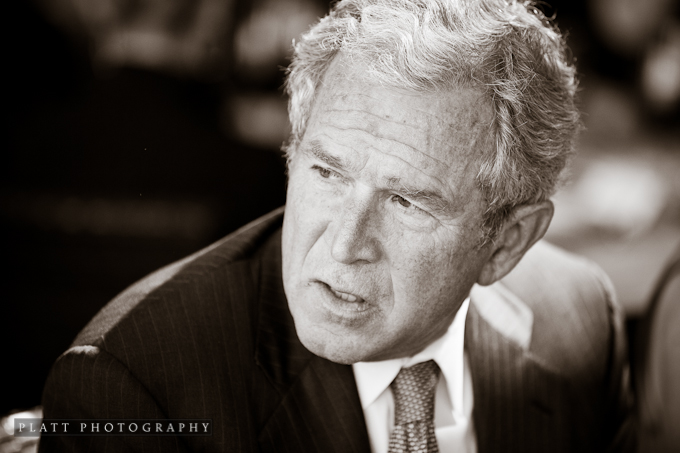
President George W Bush at the Sanctuary in Scottsdale Arizona

I spent yesterday afternoon photographing a small lunch with President George W. Bush at The Sanctuary in Scottsdale, Arizona.  I have photographed a number of weddings at the Sanctuary, and it tuns out, it is also a good place for small political events.  The small dining rooms there have a lot of great light in them.  They are essentially large north light studios.  The above photo was photographed completely with that natural north light.

President Bush was in town raising money for his Presidential Library, The George W Bush Center.  It is always a pleasure to be around President Bush.  He is a charming, gracious and down to earth man who genuinely takes an interest in people from every walk of life, ambassadors, sports figures, the chef, the staff and even the photographer’s assistant.

Melissa Jill and George W Bush

The last time I photographed the President, Melissa Jill asked if she could be my assistant the next time.  So, she was my assistant for the afternoon and got to meet President Bush and even got a photograph with him.  She also took a cool image of me photographing the president as he spoke with the guests.  It’s always good to have a few good documentary shots of myself doing something, since I am always behind the camera.  Thanks Melissa.

Jared Platt photographing President George W Bush - Photo by Melissa Jill

Here are a few more of my favorite images from the event.

President George W Bush at the Sanctuary in Scottsdale Arizona

George W Bush

President Bush is a very warm and casual person.  I know there was a lot of talk during his presidency about him being a cowboy, and I think a lot of that talk used the term in a negative way, but there is something very friendly, respectful, real and down to earth about a cowboy.  I know many cowboys and they are just good people.  While I don’t miss growing up on a ranch and doing cowboy work, I do miss the simple, good nature of the cowboys I worked with.  President Bush is a real cowboy.  You can see that in the way he interacts with people, with genuine respect and never in a condescending way.

President George W Bush

Photography: Jared Platt, Platt Photography

Subject: George W Bush

Location: The Sanctuary

Additional Photographer: Melissa Jill

1 comment » | Photography, Political Event Photography, Stories, Travel Log, Uncategorized

Back to top